Corkly › Desktop widgets
A cute desktop widget for your notes, photos and countdowns
Corkly turns a corner of your screen into a tiny corkboard — always there, never in the way.
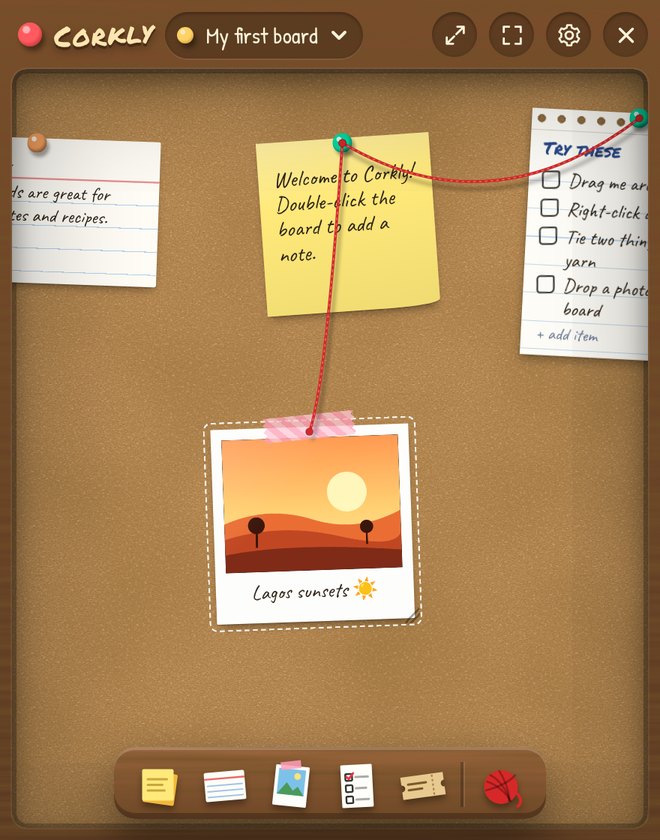
A widget that actually does something
Most desktop widgets show the weather. Corkly’s widget is a small, living corkboard: today’s checklist, a sticky note for later, a photo you love and a countdown to the weekend — all in one little window in the corner of your screen.
Switch to the full window when you want room to think, and back to the widget when you don’t.
Make it match your desk
11 board surfaces
Cork, pink cork, kraft paper, green or navy felt, chalkboard, night slate, graph paper, dot paper, pegboard and linen.
7 frame colors
Walnut, light oak, whitewash, ebony, sage, blush and ocean — so it fits a minimal setup or a cozy one.
Want just the board? Hide the toolbars and only your pins stay on screen.
Widget ideas
- A countdown to Friday, your holiday or a birthday
- Today’s three most important tasks
- A polaroid of someone you miss
- A shared board with your partner or roommates
- A quote or reminder to yourself
- A habit checklist you reset every week
Always one shortcut away
- ⌘ ⇧ Space on Mac or Ctrl + Shift + Space on Windows shows or hides your board.
- Opens when your computer starts, and lives in the menu bar or system tray.
- Optionally keep the widget on top of other windows.
Questions
Does the widget work on both Mac and Windows?
Yes — on macOS (Apple Silicon and Intel) and on Windows 10 and 11.
Can I resize it?
Yes. Drag the widget to any size and position; Corkly remembers it.
Is it free?
Yes. Widget mode, all board surfaces and frames, notes, photos, checklists, countdowns and games are free.