Corkly › Sticky notes for Mac
Sticky notes for Mac, pinned right on your desktop
A cozy corkboard that sits on your Mac’s desktop — notes, photos, checklists and voice notes, all where you can see them.
Why a corkboard instead of another notes app?
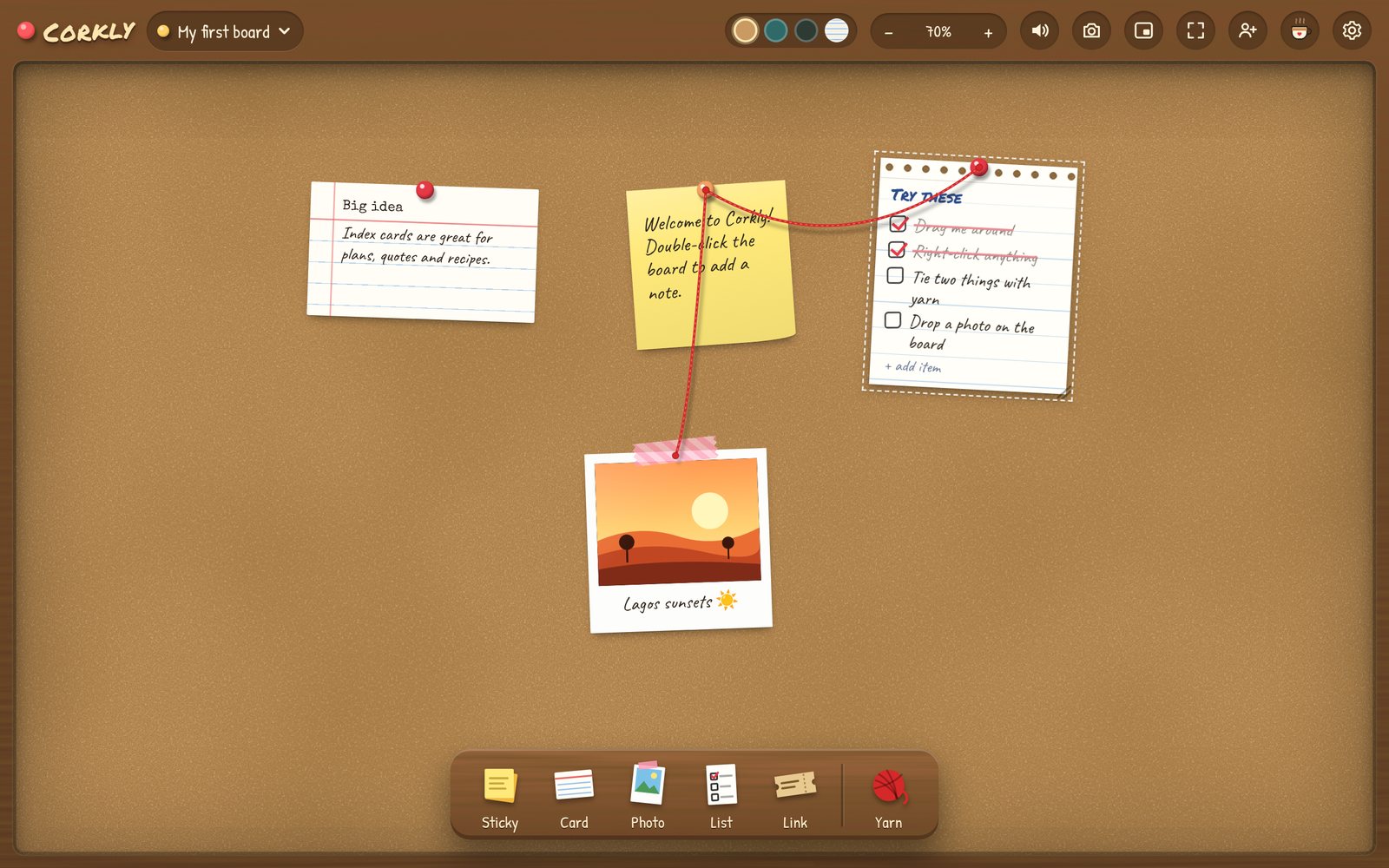
Notes apps are great at storing things — and terrible at reminding you they exist. Corkly takes the opposite approach: it’s a little corkboard that lives on your desktop, so the things you care about stay in plain sight. Sticky notes, a photo, today’s checklist, a countdown to your next trip — pinned up, not buried in a folder.
It opens with your Mac, sits in a corner as a small widget, and gets out of the way with one shortcut when you need the space.
What you can pin
- Sticky notes — six colors, handwritten style; double-click anywhere to add one.
- Polaroids — drag in a photo and give it a caption.
- Checklists — tick the last box for a DONE! stamp and confetti.
- Voice notes — record a quick message on a little cassette.
- Countdowns — birthdays, trips and launches, with a celebration on the day.
- Link tickets — paste a link and it becomes a tiny admission ticket.
- Games — X and O, Hangman and Dots & Boxes.
- Red yarn — tie related notes together, detective-board style.
Made to feel at home on macOS
- Desktop widget — shrink Corkly into a small board in the corner of your screen.
- Menu bar icon — it tucks away instead of quitting, ready when you need it.
- ⌘ ⇧ Space shows or hides your board from any app.
- Opens at login, so your board is there every morning (you can turn this off).
- One download for every Mac — Apple Silicon (M1–M4) and Intel.
- Signed and notarized by Apple, and it updates itself.
Corkly vs. the Stickies app
macOS comes with Stickies, and for a quick text note it’s perfectly fine. Here’s where Corkly is different:
| Stickies | Corkly | |
|---|---|---|
| Text notes | Yes | Yes |
| Photos, checklists, voice notes | No | Yes |
| Everything on one board | Separate windows | One corkboard, many boards |
| Share with someone, live | No | Yes — even with a Windows PC |
| Desktop widget | No | Yes |
| Price | Built in | Free (optional Plus) |
Get started in a minute
- Download Corkly and drag it into your Applications folder.
- Open it — a 30-second tour shows you around.
- Click anything on the shelf (or double-click the board) and start pinning.
Questions
Is Corkly free on Mac?
Yes. Everything you need for your own boards is free. Corkly Plus is optional and only adds more shared boards, more people per board and longer voice notes.
Does it work on Apple Silicon Macs?
Yes — one download runs natively on Apple Silicon (M1, M2, M3, M4) and on Intel Macs.
Is there an iPhone app?
Not yet. Corkly is a desktop app for Mac and Windows. You can share a board between computers, and on your phone you can email yourself the download link from getcorkly.com.
Where are my notes stored?
On your Mac. Only boards you choose to share are stored online, so the people you invite can see them.